

How to Build a Crypto Website with AI: A Practical Workflow
Article contents
Overview
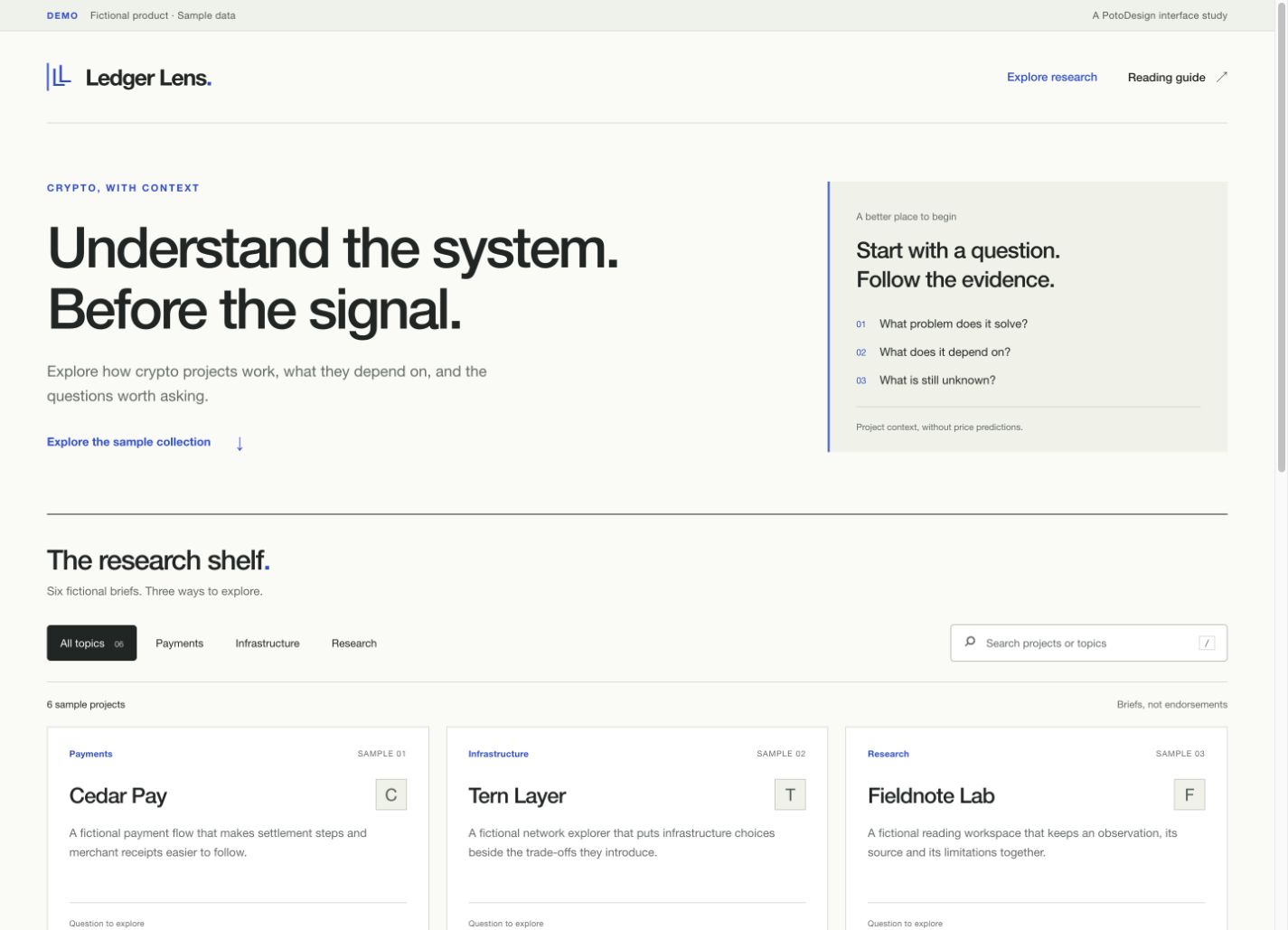
Build Ledger Lens, a crypto research prototype with search, category filters and expandable project notes. Follow seven practical steps from the brief to testing and launch preparation.
For designers who want to turn a website idea into an editable prototype.
Try the prototype Download the source
Fictional sample content. No live prices or transactions.
Overview
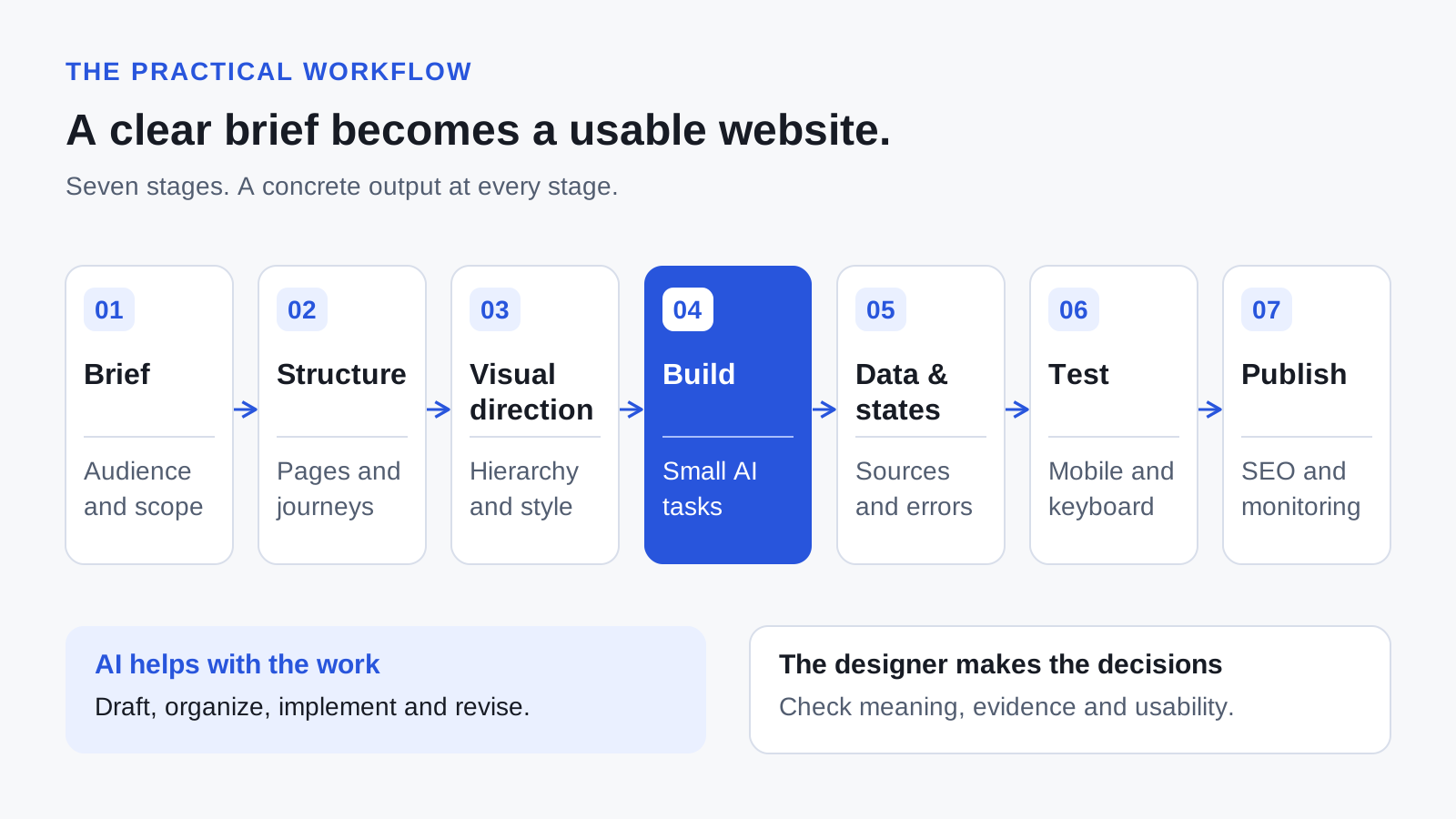
To build a crypto website with AI, start by defining the reader and the task, organise the content, establish a visual system, and build one usable flow at a time. Then check the data, interface states, mobile experience and search essentials before publishing. AI can help turn those decisions into copy and code; the decisions still need a clear owner.
For a crypto product, a convincing first screen is only one part of the job. People also need to understand what the product does, where its information comes from and what an action will do. This guide follows one small example so that each step produces something concrete.
1. Write a product brief before the AI prompt
First decide whether you need a marketing website, an information product or a transactional Web3 application. Their requirements are different. A research hub can provide value through reading and comparison; a trading application also needs carefully specified transaction behaviour.
Ledger Lens starts with a narrow job: help a reader find a project category, understand a short description and continue to relevant educational material. That gives the design a useful test: can someone complete that sequence without needing an explanation from the designer?
| Decision | Ledger Lens example |
|---|---|
| Audience | Designers and product researchers exploring crypto use cases. |
| Primary task | Find a topic, read a concise explanation and follow a source. |
| First release | Searchable project list, category filters, expandable notes and source links. |
| Content | Clearly labelled fictional examples for the prototype; verified editorial records for a public version. |
| Success check | A reader can locate a payments example and open its reading material on mobile or with a keyboard. |
Give AI this brief before asking it for a layout. If a required detail is unknown, ask it to list the missing decisions. Do not let it fill gaps with invented customers, audit badges or performance figures.
Output: one page describing the audience, task, scope and acceptance checks.
2. Plan pages around what the reader needs to do
Write the important content before polishing the interface. A useful project record needs a name, category, plain-language description, source and review date. If your public website discusses a protocol, explain the purpose of the protocol before introducing specialist terminology.
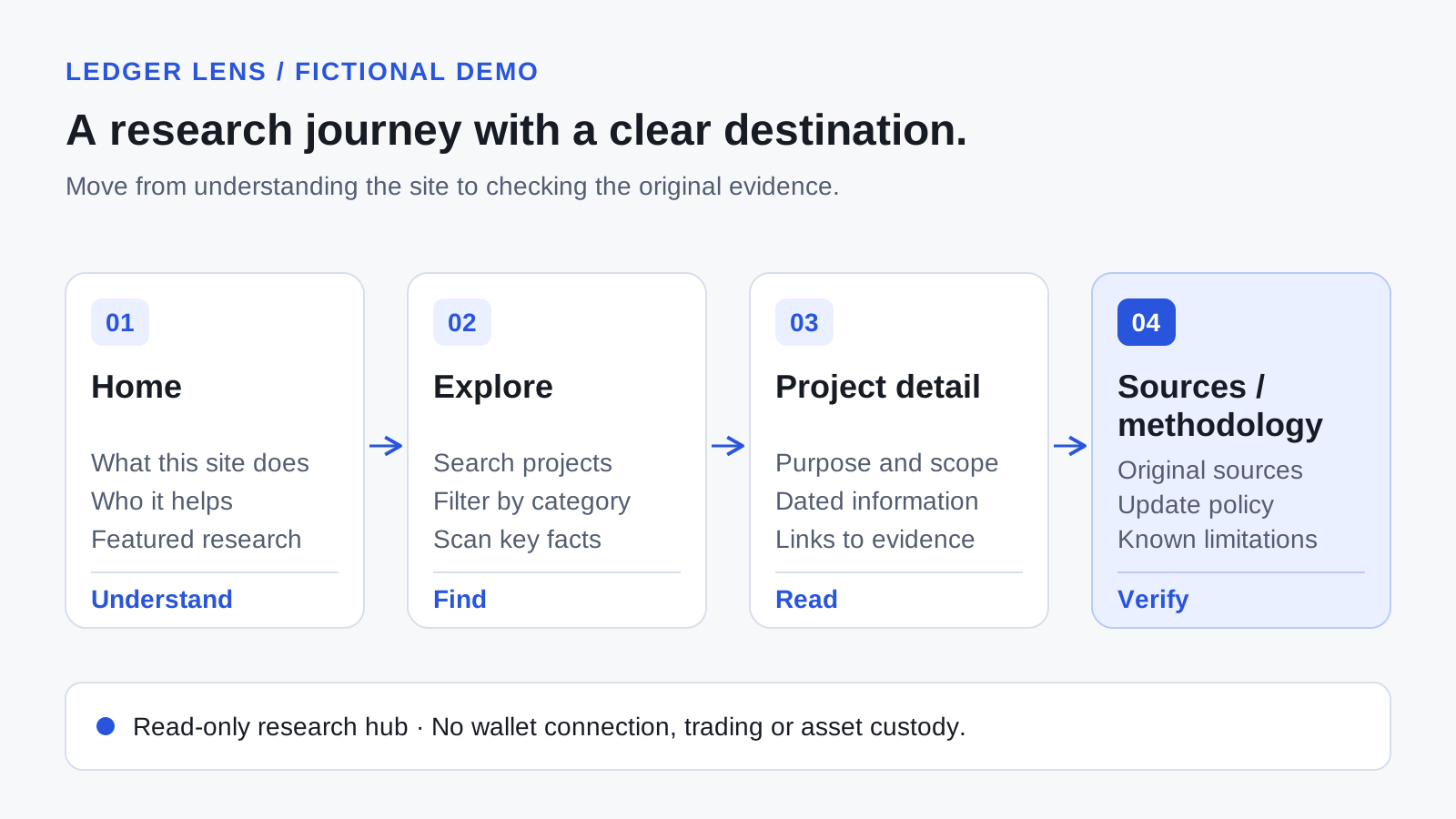
For Ledger Lens, the path is Home → Explore → Project detail → Sources. The prototype keeps that path on one page through search, filters and expandable notes. A larger public site can give each substantive project its own URL, with source material and original commentary available directly on that page.
A useful homepage introduction is specific: “Explore crypto products by what they help people do.” Follow it with a visible route into the collection. Claims such as “the future of decentralised finance” need more explanation before they help a reader choose what to do next.
Keep a content register alongside the design. Record the original source URL, publication date, date checked and the claim it supports. AI can suggest a summary; someone still needs to compare it with the source. Ethereum's Web3 design heuristics are a useful reference for clear terminology, information hierarchy and feedback.
Output: a page map and a small set of sourced content records.
3. Give every visual reference a specific purpose
A reference collection becomes useful when it explains a decision. One example might show a readable comparison table; another might show a mobile filter; a third might make sources easy to inspect. Annotate the relevant part and describe why it serves your reader.
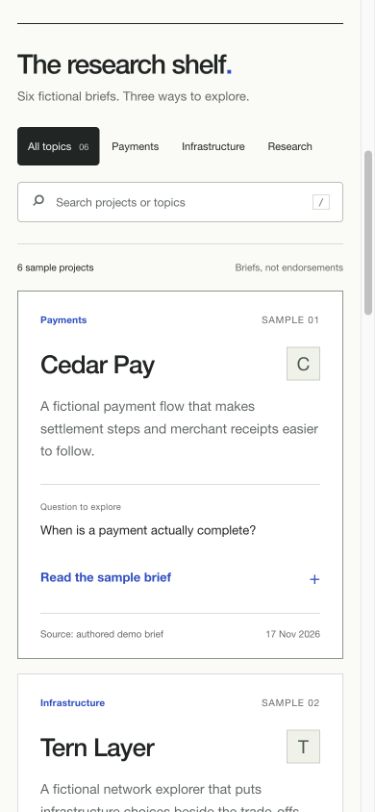
For this prototype, the direction is an editorial research tool: a light background, dark text, one blue action colour and generous spacing around the main explanation. The hierarchy prioritises project names, short summaries and sources. Decorative imagery does not interrupt the list.
Define a few repeatable rules before generating additional pages: heading sizes, reading width, spacing, button states and a mobile layout. This gives AI something specific to preserve when it edits a component.
“Use the reference to study how its filter remains readable on a small screen. Develop an original layout using our content, typography and colour rules.”
The cover illustration in this article is AI-generated. The diagrams explain the structure, while the prototype screenshots document a working interface. Keeping those roles clear makes the evidence easier to assess.

Output: an annotated reference board and a compact visual specification.
4. Build one complete flow with AI
Start with the smallest flow that demonstrates the product: open the directory, filter to a category, read a project and follow its source. Add the other sections after this works. For a front-end prototype like Ledger Lens, HTML, CSS and JavaScript are enough. An existing team may use its own framework and component library.
This example was created with Codex, using editable HTML, CSS and JavaScript files. To try the same exercise, open a project folder in your coding assistant, supply the brief and records, then use the prompt below. Review the files it creates before running the result. The example does not require a paid data API or a database.
To start from this version, download the prototype source and extract it into a folder. Open demo.html in your browser. If you have Python 3 installed, you can also run python3 -m http.server 8000 --bind 127.0.0.1 in that folder and visit http://127.0.0.1:8000/demo.html. Make one change, refresh the page and repeat the relevant check from the included brief.
Here is a reusable prompt. Replace the audience, content and constraints with your own decisions.
View the complete prompt
Build a responsive, read-only crypto research hub called Ledger Lens.

Audience: designers researching crypto product use cases.
Main task: find a category, understand an example, open its reading source.
Use the supplied records; label every fictional record as sample content.

Implement search, category filters and expandable project notes.
Provide ready, loading, empty and error states.
Use real buttons, labelled inputs and visible keyboard focus.
Keep the introduction and important content in the initial HTML.
Preserve the supplied type, spacing and colour rules.

Do not add prices, investment claims, wallet connection or fabricated proof.
Explain what works locally and what still needs a backend or data provider.
Return the editable source and a list of checks I can repeat.
Review the result against the brief. Ask for one observable improvement at a time: “Keep the filter label visible at 390 pixels wide,” or “Show the number of matching results after search.” A targeted instruction makes the next version easier to judge.
Keep a short change log with the issue, revision and outcome. Avoid presenting a deliberately weak mockup as an authentic AI first draft. A truthful record of a small fix is more useful than an impressive-looking comparison without a process behind it.
Output: an editable prototype that completes the main reading task.
5. Make the data and interface states honest
A sample dataset helps you design the interface before choosing a production data service. Label it wherever someone might mistake it for current information. Ledger Lens uses fictional project records; its state preview lets you inspect alternative behaviours without making network requests.
For a public research site, decide how records are reviewed and updated. For a market-data site, also define the provider, currency, time range and refresh behaviour. A price is hard to interpret when its timestamp or denomination is missing.
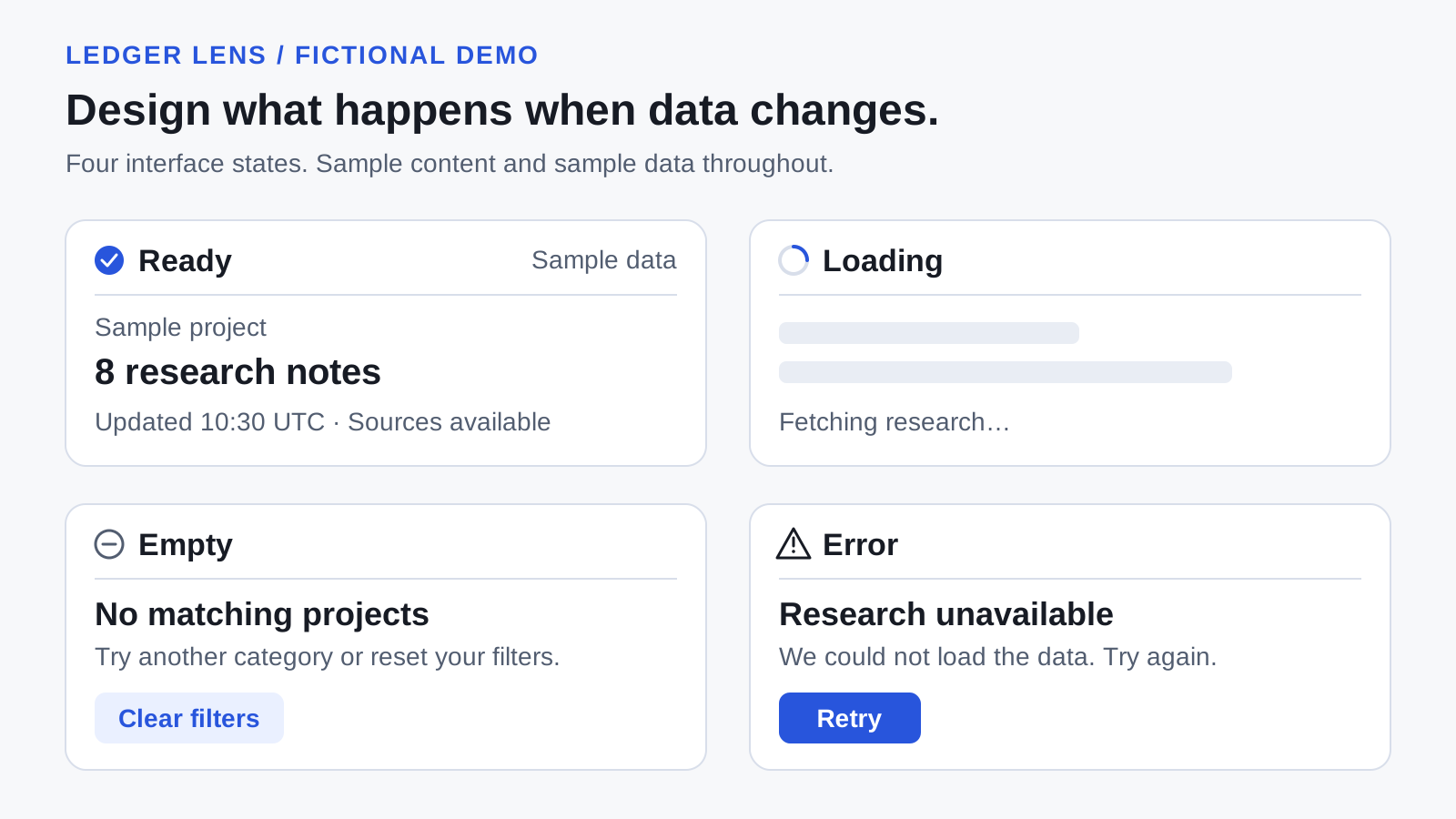
- Ready: show the result and the information needed to interpret it.
- Loading: explain what is being retrieved without showing invented values.
- Empty: distinguish “no matches” from a failure to load; offer a way to clear filters.
- Error: explain that the request failed and provide a meaningful retry.
- Stale or missing data: identify the last successful update; display unavailable values as unavailable.
If you later add cryptocurrency prices, CoinGecko's market-data schema is one example of a provider response that includes a last_updated field and nullable values. A missing value must not silently become zero. Keep secret API credentials out of browser code; CoinGecko recommends a backend or proxy for its key in its API-key guidance.
Output: a data contract and a design for the states your reader can encounter. Live data integration is a separate development step from this article's local prototype.
6. Test the task on mobile and with a keyboard
Test what a reader will actually try to do. Looking at a desktop screenshot does not tell you whether the filter works, a source link is reachable or an empty result makes sense.
- Open the site at a narrow phone width. Read the introduction and find search without horizontal scrolling.
- Select a category, then search within it. Check that both controls affect the same results.
- Search for a word that is absent. Check the empty message and the reset action.
- Use Tab, Enter and Space to navigate the controls and open project notes. Keep focus visible.
- Preview loading and error states. Check the message, layout stability and recovery action.
- Open the source links and check the claim or reading material they actually support.
W3C's accessibility design guidance is a useful starting point for readable contrast, labelled controls, feedback and layouts that work at different widths. These checks do not replace a complete accessibility audit.
When testing performance, distinguish a local measurement from real visitor data. Core Web Vitals cover loading, responsiveness and visual stability. A single local score cannot establish how the site performs for everyone.
Output: a reproducible check list and a record of the issues you fixed.
7. Prepare useful, crawlable content before launch
SEO starts with a page that answers a recognisable question. For a crypto research page, include an original explanation of the product, who it serves, its limitations and the sources behind the explanation. Repeating a short AI summary across hundreds of near-identical pages adds little for a reader.
Google's people-first content guidance emphasises usefulness and reliability. Its guidance on generative AI content also applies to titles, descriptions, structured data and image alternatives. Review those details as carefully as the visible copy.
| Element | What to prepare |
|---|---|
| Title and description | A unique, accurate description of the page's topic and usefulness. |
| Readable document | One main heading, descriptive section headings and important text available in HTML. |
| Links | Real <a href> links to related pages and original sources. |
| Images | Descriptive filenames, relevant alt text, sensible file sizes and explicit dimensions. |
| Article details | Identifiable authorship, truthful dates and structured data matching the visible article. |
| Public URL | The intended HTTPS address, consistent canonical URL and an appropriate sitemap entry. |
| Indexing | A public page returning the right HTTP status, with no accidental access or indexing blocks. |
Google can render JavaScript, but server-rendered or pre-rendered content helps make important information available to visitors and crawlers. Search and filters can enhance that content without being the only way to discover it.
Keep private staging pages out of search. Once the public URL is confirmed, check canonical links, image URLs, indexing directives and sitemap entries on the deployed version. Search Console can then help you inspect indexing and learn which queries lead readers to the page. These preparations support discoverability; they do not guarantee a position in search results.
Output: a reviewed public page and a way to observe its performance after launch.
Common questions about AI-built crypto websites
Can I build a crypto website with AI without knowing how to code?
AI tools can help you create a content website or prototype from a clear brief. You still need to inspect the result and understand its limits. Live data, accounts and financial operations add requirements that a polished mockup does not resolve.
Does every crypto website need a wallet connection?
No. A directory, research publication or product introduction can work without one. Add wallet functionality when a specific user task requires it, and design the associated network, permission and transaction states separately.
How do I add live cryptocurrency prices?
Select a suitable data provider, check its terms and limits, retrieve the relevant fields and define refresh and failure behaviour. Display the currency and update time. Protect secret credentials on the server. The prototype in this article does not implement a live feed.
Which tool should I use to build the website?
This example was built with Codex and native HTML, CSS and JavaScript. Choose an AI coding or website-building tool around the editing workflow, integrations and people who will maintain the result. A team already using a framework should evaluate how generated code fits its existing codebase. Keep access to editable files and verify the output in a browser.
Will using AI improve my Google rankings?
Using AI is not a ranking guarantee. Its useful contribution is helping you research, organise and implement a page that you then verify. Original examples, clear answers, reliable sources and accessible content are more meaningful deliverables than a claim that a page is “SEO optimised.”
What should I budget for?
Separate the AI tool subscription or usage, hosting, domain, any data service, and ongoing maintenance. Prices and limits depend on your choices. Start with the smallest working scope so you can estimate those needs from actual behaviour.
Start with one useful reading task
For your first version, choose one audience and one task you can demonstrate. Keep the brief, prototype and checks together. AI becomes easier to direct when you can show exactly what the next version needs to improve.
Ledger Lens is deliberately small: explore, filter, read and follow a source. That is enough to make concrete decisions about content hierarchy, interaction, responsive layout and data honesty before expanding into a larger product.
Keep reading
Inside Uniswap’s website
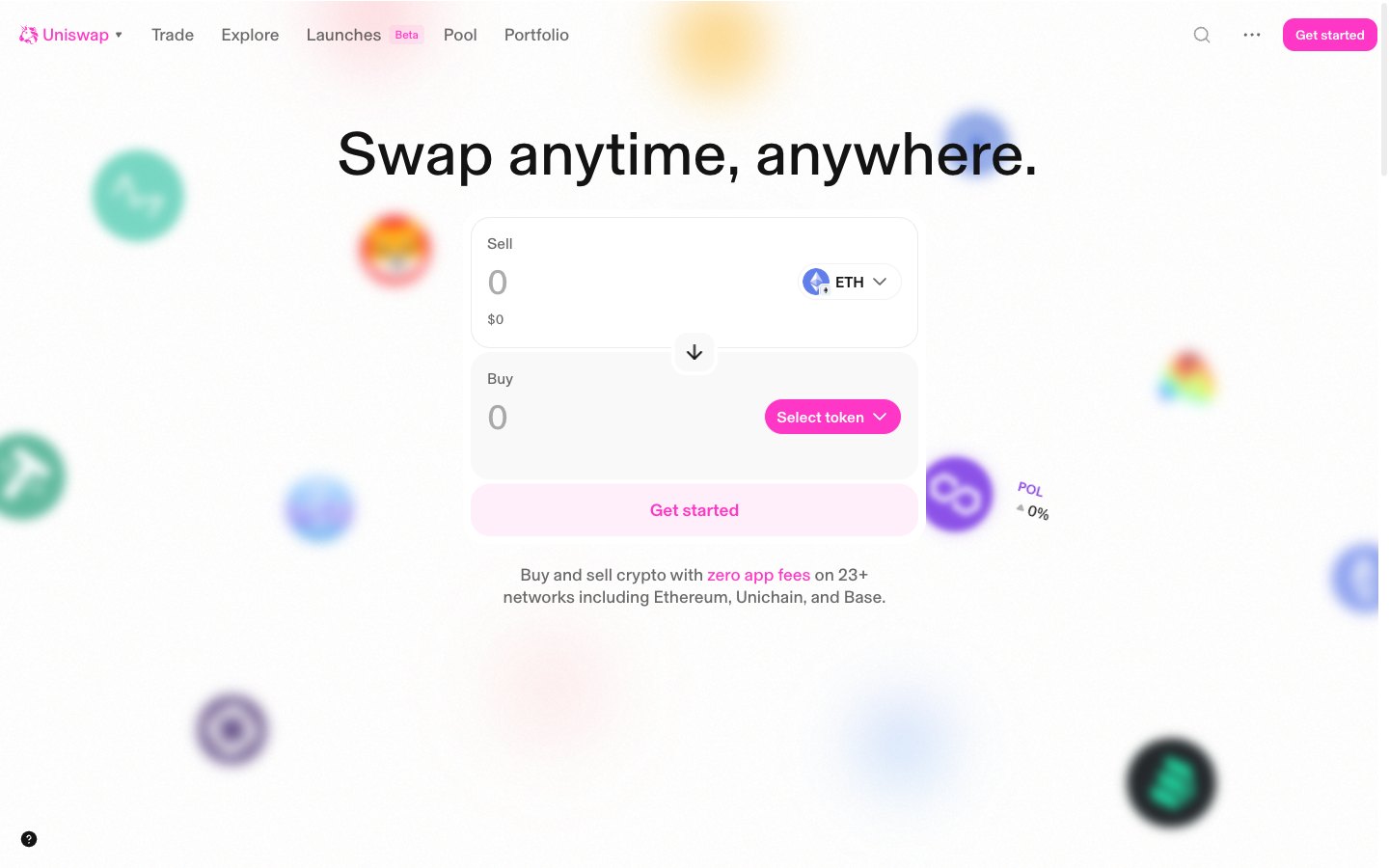
See how Uniswap organises navigation, product entry points and page structure in a real crypto website.